Maximizing Your Online Presence with a Hair Business Premade Website Banner DIY
In the competitive world of beauty and hair extensions, first impressions are not just important—they are everything. When a potential client lands on your Shopify or Wix store, the visual impact of your homepage determines whether they stay to browse or bounce to a competitor. This is where a Hair Business Premade Website Banner DIY becomes an essential tool for entrepreneurs who want professional aesthetics without the agency price tag. However, many business owners rush into using these templates without understanding how to properly customize them, leading to generic-looking sites that fail to convert.
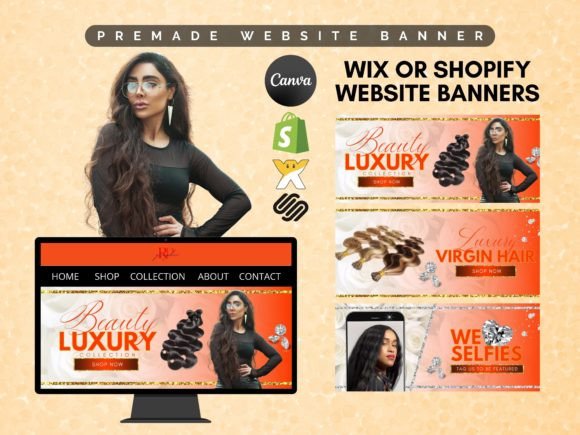
Using a premade template, such as an Orange DIY Luxury Beauty Website Banner Template, offers a fantastic starting point. It provides structure, color theory, and layout expertise that you might lack as a beginner. Yet, the ease of use in tools like Canva can sometimes lead to complacency. To truly elevate your brand, you must approach these digital assets with strategy and attention to detail.
The Trap of Generic Customization
One of the most common mistakes creators make when using a Canva Premade Web Banner is treating it as a final product rather than a foundation. Many users simply swap out the placeholder text and leave the rest untouched. While this saves time, it results in a website that looks identical to hundreds of other stores using the same template. In the virgin hair and wig industry, uniqueness is a key selling point. If your branding looks mass-produced, customers may subconsciously question the exclusivity and quality of your products.
To avoid this, take advantage of the fully editable features. Since all texts are changeable—including size, font, and style—you should align these elements strictly with your brand guidelines. Do not settle for the default font if it does not match your logo’s typography. Furthermore, while the background colors and elements are changeable, many users hesitate to deviate from the original palette. Remember, the "Orange DIY" theme is just a suggestion. If your brand identity relies on pastels or monochrome blacks, adjust the hex codes accordingly. This ensures that your slideshow banner feels bespoke rather than borrowed.
Ignoring Image Quality and Composition
A beautiful design cannot save poor photography. A frequent oversight when editing these 1920 x 780 px templates is inserting low-resolution images or poorly lit product shots. The drag-and-drop feature makes it easy to insert your image, but it does not fix bad lighting or cluttered backgrounds. In the hair business, texture and shine are critical. If your banner image is pixelated or dark, it undermines the promise of "luxury" that the template design tries to convey.
Before uploading your photos to the template, ensure they are high-resolution and professionally edited. Use images that showcase the movement and quality of your virgin hair or lashes. Additionally, consider the composition within the fixed frame. Since the size of the templates is not changeable, you must work within the 1920 x 780 px constraints. Ensure that your focal point—whether it is a model wearing a wig or a close-up of lash extensions—is centered and not obscured by text overlays. You can add, remove, or reposition elements to create breathing room around your product, enhancing its visual appeal.
Overlooking Mobile Responsiveness and Readability
While these banners are designed for desktop web slideshows, a significant portion of your traffic will come from mobile devices. A common misunderstanding is assuming that what looks good on a large monitor will translate perfectly to a smartphone screen. Text that appears elegant and readable at 1920 pixels wide may become microscopic or cramped on a mobile view. This affects usability and can frustrate potential customers who struggle to read your value proposition.
To mitigate this, keep your text concise. Use strong, clear headlines that communicate your offer instantly. Avoid long paragraphs in your banner text. Instead, use short, punchy phrases like "Premium Virgin Hair" or "Luxury Lashes Collection." After customizing your banner in Canva, always preview how it looks on different devices. If possible, test the actual implementation on your Shopify or Wix site to ensure the text remains legible and the key visual elements are not cropped awkwardly on smaller screens.
Neglecting Brand Consistency Across Platforms
Another critical error is treating the website banner as an isolated element. Your web banner should not exist in a vacuum; it must harmonize with your social media graphics, packaging, and email newsletters. Many entrepreneurs customize their banner to look great but forget to update their other touchpoints, creating a disjointed customer experience. This inconsistency can confuse customers and dilute brand recognition.
Use the customizable nature of the DIY kit to establish a cohesive visual language. If you choose a specific shade of orange or a particular font style for your banner, carry those exact elements into your Instagram posts and Facebook ads. This repetition builds trust and familiarity. The beauty of using a system like Canva is that you can save your brand colors and fonts, making it easier to replicate this consistency across all marketing materials without extra effort.
Maximizing Value Through Strategic Editing
To get the most out of your purchase, view the template as a flexible toolkit. You receive three beauty website premade banners, which allows for variety in your slideshow. Do not use the same image for every slide. Instead, rotate through different product categories—such as wigs, bundles, and closures—to showcase the breadth of your inventory. This keeps the homepage dynamic and engaging for returning visitors.
Additionally, leverage the ability to change all background colors and elements to create seasonal variations. During holidays or special sales events, tweak the color scheme to match the occasion. This small effort signals to customers that your business is active and current. Since the templates are super easy and editable, you can make these updates quickly without needing advanced graphic design skills.
Ultimately, a Hair Business Premade Website Banner DIY is more than just a time-saver; it is a strategic asset. By avoiding common pitfalls like generic customization, poor image selection, and inconsistent branding, you can transform a simple template into a powerful conversion tool. Take the time to understand the features, respect the design principles, and infuse your unique brand personality into every pixel. This approach ensures that your online store not only looks professional but also resonates deeply with your target audience, driving both engagement and sales.
When you are ready to elevate your digital storefront, remember that the tools are only as good as the strategy behind them. Use these premade banners to save your business budget, but invest your creativity to make them uniquely yours. With careful attention to detail and a focus on quality, your website will reflect the luxury and professionalism that your customers expect from a top-tier beauty brand.