Summer PowerPoint Template: Versatile Slides
Presenting ideas effectively requires more than just good content; it demands a visual framework that supports your message without overwhelming it. The Summer - Powerpoint Template offers a structured yet flexible solution for anyone looking to elevate their slide decks. Whether you are pitching a new business venture, teaching a classroom of students, or sharing personal travel memories, the right template can significantly reduce preparation time while enhancing visual appeal. This resource is designed to be inclusive, catering to a wide spectrum of users from complete beginners to seasoned design professionals.
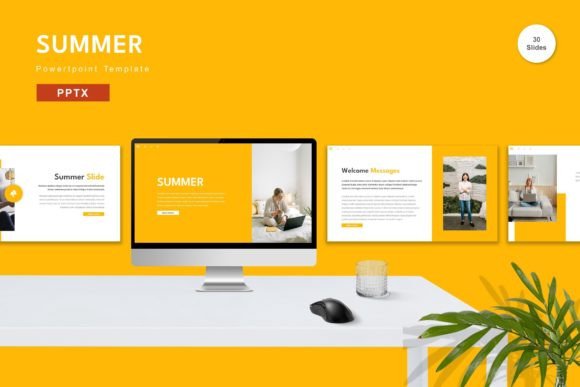
At its core, this template provides a comprehensive set of tools to streamline the creation process. It includes 150 total slides across five premade color schemes, ensuring that you have enough variety to cover diverse topics without starting from scratch. The inclusion of 30 useful, pre-designed slide layouts means that common presentation needs—such as team introductions, data visualization, and timeline overviews—are already addressed. For those who value efficiency, the drag-and-drop functionality allows for rapid customization, making it an ideal choice for tight deadlines.
Why Design Flexibility Matters for Different Users
One size rarely fits all in the world of presentations. Different audiences approach a template like Summer with distinct priorities and goals. Understanding how various groups can leverage these features helps in determining if this tool aligns with your specific needs.
For entrepreneurs and small business owners, time is often the most scarce resource. When preparing investor decks or client proposals, the ability to quickly input content and replace placeholder images is crucial. The vector-based nature of the elements ensures that graphics remain crisp regardless of scaling, which is vital for maintaining a professional image during high-stakes meetings. The five premade colors allow businesses to align the presentation with their brand identity with minimal effort, simply by adjusting the master slides.
Educators and trainers face a different set of challenges. They need clarity and consistency to keep learners engaged. The animated slides included in the package can help break up monotony and highlight key concepts dynamically. Since the template relies on recommended free web fonts, educators can share files with students or colleagues without worrying about font compatibility issues. This reliability ensures that the presentation looks exactly as intended on any device, reducing technical glitches during lectures.
Creative professionals and marketers often look for a balance between structure and creative freedom. While they may have advanced design skills, starting with a solid foundation allows them to focus on storytelling rather than layout mechanics. The editable master slides provide a robust framework that can be tweaked extensively. Marketers might use the clean layouts to showcase campaign results, using the vector icons to create custom infographics that match their brand guidelines perfectly.
Practical Applications Across Industries
The versatility of the Summer - Powerpoint Template becomes evident when examining real-world applications. Here is how different users might utilize the included features:
- Freelancers: Use the portfolio slides to showcase past work. The clean aesthetic ensures that the focus remains on the projects rather than the design itself.
- Bloggers and Content Creators: Create media kits or pitch decks for potential sponsors. The 30 useful slides include layouts perfect for displaying statistics and audience demographics.
- Corporate Teams: Standardize internal reporting. By using the master slides, companies can ensure that every department’s quarterly review follows the same visual language, fostering a cohesive corporate identity.
- Hobbyists and Personal Users: Document life events such as weddings, reunions, or travel logs. The ease of replacing placeholder images makes it simple to create a polished photo album in presentation format.
Each of these scenarios highlights a different priority. A freelancer might prioritize speed and professionalism, while a hobbyist might value ease of use and aesthetic appeal. The template’s design accommodates these varying needs by offering a middle ground: sophisticated enough for business, yet accessible enough for personal use.
Ease of Use and Technical Considerations
For beginners, the learning curve associated with presentation software can be daunting. The Summer - Powerpoint Template mitigates this by emphasizing user-friendly features. The "Just Drag and Drop" capability means that users do not need to understand complex layering or alignment tools. You simply select an element, move it to the desired location, and drop it. This intuitive interaction model lowers the barrier to entry, allowing novices to produce high-quality results without extensive training.
Technical reliability is another critical factor. The template comes with five PPTX files, ensuring compatibility with standard versions of Microsoft PowerPoint. The note that preview images are not included is standard practice, but it underscores the importance of the placeholder system. Users are encouraged to input their own content and replace placeholders with their specific imagery. This approach ensures that the final product is unique to the user, avoiding the generic look that often plagues template-based designs.
The inclusion of a Readme First file is a thoughtful touch for less tech-savvy users. It likely contains instructions on how to install fonts, edit master slides, and troubleshoot common issues. This support documentation enhances the overall user experience, providing a safety net for those who might feel overwhelmed by the sheer number of options available.
Evaluating Value and Long-Term Usefulness
When considering whether to adopt this template, it is helpful to weigh the immediate benefits against long-term utility. The 150 slides offer substantial volume, meaning that this single purchase can serve multiple projects over time. The five premade colors provide enough variation to prevent visual fatigue if you use the template frequently. However, the true value lies in the editability of the elements.
Because the graphics are vector-based, they can be resized without loss of quality. This is a significant advantage over raster-based templates, which can become pixelated when enlarged. For users who plan to project their slides on large screens or print them as handouts, this feature ensures consistent quality. Additionally, the ability to change colors globally through the master slides saves hours of manual adjustment, making future updates quick and painless.
For those concerned about cost-effectiveness, the template’s reusability is a key selling point. Instead of hiring a designer for every presentation, users can invest in a versatile tool that pays for itself after just a few uses. The commercial value extends beyond mere savings; it empowers individuals and small teams to maintain a high standard of visual communication independently.
Making the Right Choice for Your Needs
Deciding if the Summer - Powerpoint Template is right for you depends on your specific goals. If you prioritize speed, consistency, and a professional look without the need for advanced design skills, this template is a strong candidate. It is particularly well-suited for those who need to produce presentations regularly but lack the time or resources to design each one from scratch.
However, if you require highly specialized, non-standard layouts or intricate animations beyond what is provided, you might find the premade structures limiting. In such cases, the template can still serve as a starting point, but significant customization would be required. For most users, though, the balance of structure and flexibility offered here strikes the right chord.
Ultimately, the goal of any presentation tool is to facilitate communication. By handling the visual heavy lifting, the Summer template allows you to focus on what truly matters: your message. Whether you are a marketer analyzing trends, a teacher explaining concepts, or an entrepreneur seeking funding, having a reliable, attractive, and easy-to-use template can make the difference between a forgettable slideshow and a compelling narrative.
To explore how this template can fit into your workflow, consider downloading the package and experimenting with the master slides. Test the drag-and-drop features with your own images and text. See if the five color schemes align with your brand or personal style. By taking a hands-on approach, you can better assess whether this tool meets your expectations for quality, ease, and versatility.
Get it now Summer - Powerpoint Template for All Business and Personal Needs and start transforming your presentations today. With all elements editable and a wide range of slides at your disposal, you have the freedom to create something truly unique while saving valuable time.