Grociola Google Slide Template: A Practical Review for Professional Presentations
In the modern professional landscape, the ability to communicate ideas clearly and visually is as critical as the ideas themselves. Whether you are an entrepreneur pitching to investors, a marketer presenting quarterly results, or an educator designing course materials, your presentation deck serves as a primary vehicle for your message. While many professionals rely on default software templates, these often lack the polish and flexibility required for high-stakes environments. This is where specialized resources like the Grociola - Google Slide Template enter the workflow, offering a structured yet adaptable foundation for creating compelling visual narratives.
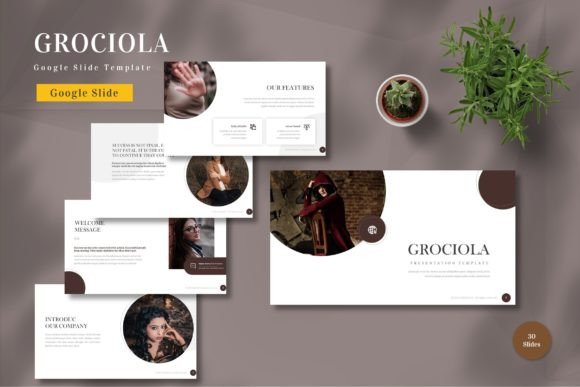
The Grociola template is not merely a collection of static images; it is a comprehensive design system built specifically for Google Slides. Designed with both business and personal needs in mind, it aims to bridge the gap between aesthetic appeal and functional utility. By providing a robust set of pre-designed elements that are fully editable, it allows users to focus on content strategy rather than wrestling with alignment tools and color pickers. This article explores the features, usability, and practical value of Grociola, helping you determine if it aligns with your presentation goals.
Understanding the Core Value Proposition
At its heart, the Grociola - Google Slide Template is designed to save time while maintaining a high standard of visual consistency. One of the most significant challenges in creating presentations from scratch is ensuring that every slide adheres to a cohesive design language. Inconsistent fonts, mismatched colors, and irregular spacing can distract the audience and undermine the presenter’s credibility. Grociola addresses this by utilizing master slides and vector-based graphics, ensuring that every element scales perfectly and remains consistent across the entire deck.
The template includes 150 total slides, which is a substantial library for any user. However, quantity alone is not the metric of success; relevance is. The package offers 30 useful, distinct slide layouts that cover common presentation scenarios such as team introductions, data visualization, timeline overviews, and project roadmaps. These are complemented by variations in layout and composition, allowing for a dynamic flow that keeps the audience engaged without sacrificing professionalism.
Design Flexibility and Customization
A standout feature of the Grociola template is its emphasis on editability. Many premium templates look impressive in previews but become frustrating to use because their elements are flattened or locked. In contrast, Grociola ensures that all elements are editable. Users can input their content, replace placeholder images with their own assets, and adjust colors to match specific brand guidelines with ease. This level of flexibility is crucial for businesses that need to maintain strict brand identity standards.
The template comes with five premade color schemes. This variety is particularly useful for agencies or freelancers who work with multiple clients, each having different brand palettes. Instead of manually recoloring every shape and text box, users can switch between these premade themes or use them as a starting point for custom branding. The reliance on recommended free web fonts further enhances accessibility, ensuring that the presentation looks consistent regardless of the device used to view it, provided the fonts are linked correctly.
Additionally, the inclusion of animated slides adds a layer of sophistication. Animation, when used sparingly and purposefully, can guide the viewer’s attention and emphasize key points. Grociola includes these animations pre-built, saving users the tedious process of setting up motion paths and transition effects manually. This "drag and drop" ease of use means that even those with limited design experience can produce polished, professional-grade presentations.
Usability and Workflow Integration
For professionals who live in the Google ecosystem, compatibility is non-negotiable. The Grociola - Google Slide Template is delivered as five Google Slide files, ensuring seamless integration with existing workflows. There is no need to convert files from PowerPoint or Keynote, which often results in formatting errors and lost elements. The widescreen format is optimized for modern displays and projectors, ensuring that your content fills the screen appropriately without awkward black bars or stretching.
The "Readme First" file included in the package is a small but significant detail. It provides essential information on how to best utilize the template, including instructions on font installation and color customization. This documentation reduces the learning curve and helps users avoid common pitfalls. Furthermore, the vector-based nature of the graphics means that icons and shapes remain crisp at any size, a critical factor for large-screen presentations where pixelation can be distracting.
From a practical standpoint, the template supports a modular approach to presentation building. Users do not need to use all 150 slides. Instead, they can cherry-pick the layouts that best suit their narrative structure. For instance, a startup founder might prioritize the problem-solution slides and financial projection charts, while an educator might focus on the content-heavy layouts and quiz formats. This modularity makes the template versatile enough to serve diverse industries and use cases.
Who Benefits Most from Grociola?
While the template is marketed for "all business and personal needs," certain groups will find it particularly valuable. Entrepreneurs and small business owners often lack the budget for a dedicated graphic designer but still need to present a polished image to stakeholders. Grociola provides a cost-effective solution that elevates their visual communication without requiring advanced design skills.
Marketers and consultants also stand to benefit significantly. These professionals frequently create decks for different clients or campaigns, requiring rapid turnaround times. The ability to quickly swap colors and images while maintaining a consistent structure allows for efficient production of high-quality materials. Similarly, educators and trainers can use the template to create engaging lecture materials that break up text-heavy content with visual aids, improving student retention and engagement.
Freelancers and creators who offer presentation design as a service can also leverage Grociola as a base framework. By starting with a solid structural foundation, they can reduce the time spent on initial setup and focus more on customizing the content to meet specific client needs. This efficiency can translate into higher profitability and the ability to take on more projects.
Considerations and Limitations
It is important to approach any template with realistic expectations. While Grociola offers extensive customization, it is still a template. Users who require highly unique, bespoke designs may find the premade structures somewhat restrictive if they attempt to deviate too far from the intended layout. Additionally, the note that "preview images not included" means that users must source their own photography and illustrations. This is standard for most templates but requires users to have access to a library of high-quality images or the skills to source them effectively.
Furthermore, while the animations are a nice touch, they should be used judiciously. Overuse of animation can detract from the message and appear unprofessional in conservative corporate environments. Users should exercise discretion and tailor the level of motion to their specific audience and context.
Final Thoughts on Long-Term Value
The Grociola - Google Slide Template represents a solid investment for anyone looking to streamline their presentation creation process. Its strength lies in the balance between structure and flexibility. By providing a comprehensive set of editable, vector-based slides with multiple color options and smooth animations, it removes many of the technical barriers associated with design.
For professionals who value efficiency, consistency, and visual appeal, Grociola offers a practical tool that enhances communication effectiveness. It is not just about making slides look pretty; it is about creating a clear, coherent, and engaging narrative that resonates with the audience. Whether you are preparing for a critical pitch, a training session, or a personal project, this template provides the foundational support needed to deliver your message with confidence and clarity. By reducing the time spent on design mechanics, it allows you to focus on what truly matters: the content and the connection with your audience.